Wednesday, June 24, 2015

Place matters to personal and population health.

Place matters to personal and population health.  The social determinants of health have begun to shape public health and policy interventions and neighborhood socioeconomic and demographic characteristics play significant roles in influencing health outcomes. 

The continued realization that place matters has led to the emergence of the field of population health, which includes health determinants, health outcomes, and links between the two.  The Robert Graham Center, the policy arm of the American Academy of Family Physicians, recently hosted a forum focused on population health, with experts from New Mexico and North Carolina offering their perspectives on how to address the social determinants of health.  Dr. Arthur Kaufman, the vice chancellor for community health at the University of New Mexico Health Sciences in Albuquerque, discussed how practices in New Mexico’s university system are beginning to take note of the importance of social determinants that are often ignored, such as low education or poor living conditions.  Kaufman also mentioned the critical role of community health workers in helping physicians reach and assist community members dealing with financial or social issues.  Dr. L. Allen Dobson, Jr., president and CEO of Community Care of North Carolina (CCNC), described how CCNC is linking their data with real-time pharmaceutical data to create risk scores for patients.  Dobson noted how these data have been essential for reducing hospital admissions and readmissions by allowing physicians to reach patients before patients reach the hospital.  See future Primary Care Forum topics.

Issues remain, however, as to what determinants and outcomes are most important to measure, as well as the availability of these data at relevant geographies. In response to this, the Centers for Disease Control and Prevention (CDC) created a resource guide of the most frequently recommended health outcomes and determinants, the Community Health Assessment for Population Health Improvement. The guide breaks down the data into two domains, Health Outcomes and Health Determinants, and then separates dozens of indicators into several categories, including Mortality, Morbidity, Health Care, Health Behaviors, Demographics, Social Environment, and Physical Activity.


Using this guide as a framework, HealthLandscape created the Population Health Mapper which includes the majority of the Health Outcome and Health Determinant Metrics identified in the report at the county level.

The Population Health Mapper allows users to select metrics from the seven categories and use a slider bar to set thresholds. By default, thresholds are set at values that represent national benchmarks.  The tool will highlight those counties that are outside of the national benchmark, or will incrementally shade or remove counties depending on how the user modifies the thresholds for selected indicators.  Darker gradations of color will indicate which counties are outside of the established thresholds for multiple indicators.  Users can also view a histogram that shows the number of counties outside of thresholds by the number of indicators, allowing users to quickly filter by the number of indicators that are outside of the established thresholds.

You can use the Population Health Mapper at:


To learn more about the Population Health Mapper, join one of regular webinars at

Tuesday, May 19, 2015

HealthLandscape's Accountable Care Organization (ACO) Explorer

As part of the Affordable Care Act, new models of health care delivery have been developed with the objective to improve the quality of care while reducing costs.  Accountable Care Organizations (ACOs), which are made up of groups of doctors, hospitals, and other health care providers that coordinate care for Medicare beneficiaries, are being touted as potential solutions for the inefficiency and fragmentation of the U.S. healthcare system. One of the early Medicare ACO programs, the Medicare Shared Savings Program (MSSP), has shown promising results. ACOs in the MSSP have experienced improvements in the majority of quality measures while generating cost savings (see http://blog.cms.gov/2014/12/22/acos-moving-ahead/).

In order to compare how ACO performance varies geographically, HealthLandscape developed the ACO Quality Explorer, which is a spatial visualization tool for data from the 211 ACOs taking part in the MSSP.  The ACO Explorer allows users to visualize 33 quality measures organized into five domains: patient/caregiver experience, care coordination/patient safety, preventive health, at-risk population diabetes, and at-risk population heart-related measures. Each ACO is given a site score based on the percentage of quality measure benchmarks set by the Centers for Medicare and Medicaid that the ACO has met. ACOs are displayed as points on the map colored green (4 or more domains with all measures at or above thresholds), yellow (2 or 3 domains with all measures at or above thresholds), or red (less than 2 domains with all measures at or above thresholds), allowing users to quickly compare different ACOs across a geographic area.  When users click on a specific site, they can view exploding rollover windows which contain data about the quality measures included in each of the five domains. In addition, users can use the Stats tool in the ACO Quality Explorer to perform statistical analyses to explore the relationship between ACO quality metrics for an ACO and population health indicators for the county in which an ACO is located.


To access the ACO Explorer, see http://www.healthlandscape.org/ACOExplorer/map.cfm


Want to Learn More?


Learn more about HealthLandscape with our online Webinars and Training
In-depth instruction on using HealthLandscape tools and additions to our ever-growing data library


Monday, April 20, 2015

The Nursing Home Explorer: Spatial Visualization of Nursing Home Compare

Consumers who are considering placing a loved one in a nursing home have important questions about nursing home safety and quality. Fortunately, the Centers for Medicare and Medicaid have created Nursing Home Compare, which is an online database that contains quality data for all nursing homes certified under Medicare and Medicaid. Nursing Home Compare provides a star-ratings system of nursing home characteristics such as health inspections, staffing, quality measures, and overall quality. Consumers can use Nursing Home Compare to make a side-by-side comparison of the star ratings for up to three different nursing homes.


Map view showing star-ratings for nursing homes in northern Kentucky (filtered by state), and rollover windows for nursing home address and nursing home characteristics star-ratings

HealthLandscape created the Nursing Home Explorer to provide a user-friendly spatial visualization tool for Nursing Home Compare data for nursing homes in Ohio, Kentucky, and Indiana. Each nursing home is displayed as a red, yellow, or green point on the map based on its overall quality star-rating, allowing users to quickly compare the quality of neighboring nursing homes. When a user moves their mouse over a point, the nursing home name, address, and the star-ratings for the nursing home’s staffing, health inspections, quality measures, and overall ratings are displayed in windows on the screen. Users are able to filter the selection of nursing homes displayed on the map by ownership, provider type, or state, and have the option to view the data displayed on the map in a table format. In the Stats tab, users can examine the correlation between nursing home characteristics and community demographic and health data for the county in which the nursing home is located. The Nursing Home Explorer is a very useful tool for quickly comparing multiple nursing homes in Ohio, Kentucky and Indiana, and provides an important spatial visualization component for Nursing Home Compare data. 

Stats view showing correlation between overall star-ratings for nursing homes and percent Age 65 & older below 100% of federal poverty level at the county level (for the county in which the nursing home is located) in Kentucky

To access the Nursing Home Compare Explorer, see http://www.healthlandscape.org/NursingHomeExplorer/map.cfm 


Want to Learn More?


Learn more about HealthLandscape with our online Webinars and Training
In-depth instruction on using HealthLandscape tools and additions to our ever-growing data library


For more information about Nursing Home Compare, see http://www.medicare.gov/nursinghomecompare/About/What-Is-NHC.html


Wednesday, February 25, 2015

Medicare Data Portal


Increased availability of health data through the U.S. Government’s Open Data Initiative has provided researchers, policymakers, and the general public with access to dozens of new datasets.  Despite the increased availability, the data are often cumbersome to work with and few tools exist that present the data in ways that are useful for the public and decision-makers.


We created a web-based data visualization and mapping tool, the Medicare Data Portal, to simplify access to this rich data source.


Comparison map where HRRs with high prevalence of Diabetes and low A1C Testing are displayed in Red

The Medicare Data Portal engages decision-makers and researchers with county and Hospital Referral Region (HRR) data from the Centers for Medicare & Medicaid (CMS) Geographic Variation database and the Chronic Conditions Warehouse.  The tool allows users to visualize health outcome, cost, and demographic data for the Medicare population using maps, graphs, and trend charts.  Users also have the ability to examine the relationship between two indicators (for example, Inpatient Costs and Diabetes) with side-by-side maps and a comparison tool that uses percentiles to visualize the relationship between variables.

The Medicare Data Portal can also be used simultaneously with other tools to explore relationships between hospital-level indicators and county and HRR-level Medicare indicators.  The portal can be used as a resource for policymakers and researchers concerned with Medicare spending and the relationships between Medicare costs and health outcomes.

Where can I try it?

Visit HealthLandscape at http://www.HealthLandscape.org

Select "Medicare Data Portal" from the HealthLandscape Tools

Want to Learn More?


Learn more about HealthLandscape with our online Webinars and Training
In-depth instruction on using HealthLandscape tools and additions to our ever-growing data library


Monday, January 5, 2015

Visualizing Global Health

Global health issues have received increased attention due to the Ebola outbreak, with President Obama recently asking Congress for $6 billion in the fight against the crisis. While the Ebola outbreak is serious and has resulted in thousands of deaths, a number of other diseases, such as HIV/AIDS and Tuberculosis, continue to plague countries throughout the world. Other health issues, including infant mortality, a shortage of doctors and nurses, and a lack of healthcare spending also play critical roles in shaping population health throughout the world. As researchers and policymakers continue to grapple with these issues, it is becoming increasingly important that relevant data and tools are easily accessible that can help shed light on these issues. One such tool is the World Health Mapper, a free web-based mapping and data visualization tool.

The World Health Mapper (http://www.healthlandscape.org/worldhealth/hlplayer.html) allows users to visualize data related to demographics, vital statistics, child and infant health, disease prevalence, and healthcare capacity & expenditures for countries across the world in the form of maps, charts, and graphs. Users also have the ability to examine the relationship between two indicators with side-by-side maps and a comparison tool that groups countries based on percentiles.

For example, the map shows the relationship between health care spending per capita and infant mortality, where red countries have high spending (70th percentile or greater) & low infant mortality (30 percentile or below), and light blue countries have low spending (30th percentile or below) and high infant mortality (70 percentile or greater).


The data come from a variety of sources, most notably the World Development Indicators Catalog produced by the World Bank and the Organization for Economic Co-operation and Development (OECD) Health Database.  In addition, the World Health Mapper contains data about the state of Family Medicine around the globe. 

The World Health Mapper is also available at the Center for Global Health Initiatives and the Robert Graham Center.


Monday, December 16, 2013

New Data Portal Feature: Clustered Points for Multi-Site Locations

Think about your last visit to your doctor. Did you go to a medical office building or to a standalone practice?

The United Way of Greater Cincinnati shares the same address as the Visiting Nurses Association, Local Initiatives Support Corporation (LISC), and several affiliated United Way agencies.

So what, you're saying. Who cares?

Well, if you're mapping data, you should.

You see, some GIS data viz tools get confused when multiple agencies share the same physical address. They can only display one point on the map, so they pick one, usually the one "on top," the one the underlying code accesses first.

This isn't good.

Why? Because when you click on the point, you see data for only one agency, not every agency at that address. You get results for one clinic, not for every clinic in the building. The results can be incomplete at best, misleading at worst.

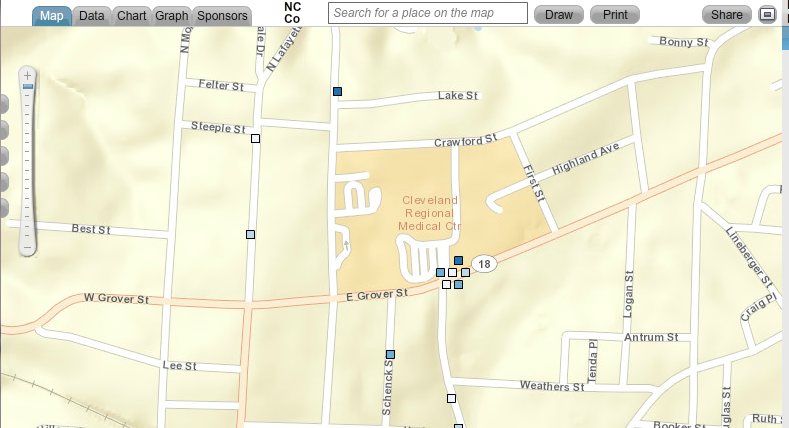
A screen shot showing one point that represents multiple sites.
The point could represent multiple clinics, physician practices, or social service agencies that all share the same address.


That's why we've added a new feature called clustered points to our Community Data Portal. It's a behind-the-scenes feature, one you don't have to access or configure in any way.

When you click on a point that has multiple sites, the points spread out. Each point becomes clickable, and each site's unique data becomes visible. You see all data relevant to that location, not just a portion of it.


Map showing clustered points. When you click on a point that represents multiple sites,
the points spread out, showing data for every site at that location.


The Community Data Portal is but one way to map population data. Register today for one of our free HealthLandscape webinars to learn more about GIS data visualization.


Visualizing Data with HealthLandscape
Overview of all of our data visualization tools, including the Site Performance Explorer
Tuesday, December 17, 2:00 pm ET
Introduction to HealthLandscape
In-depth instruction on using HealthLandscape, our free online mapping tool and data library
Tuesday, January 7, 2:00 pm ET
The Community Data Portal
In-depth demonstration of our award-winning data dissemination tool
Tuesday, January 14, 2:00 pm ET

Monday, December 9, 2013

Congratulations to Michael Topmiller, PhD!

Michael Topmiller, PhD
Congratulations to Michael Topmiller on his recently awarded PhD from the University of Cincinnati Department of Geography. You've met Michael (virtually) if you've sat in on any of our webinars. He's the voice behind the slides, the person who so capably demonstrates our tools and answers your questions. When he's not presenting webinars, he's wrangling data sets and configuring mapping tools.

For his PhD, Michael focused on the Licking River Greenway and Trails (LRGT) in Covington and asked, "How does including local perceptions of safety change how we view access to physical activity resources, especially among low-income and minority populations?"

The LRGT extends along the Licking River in Northern Kentucky, and winds through several Covington neighborhoods, including Eastside, Helentown, Austinburg, Wallace Woods, and Levassor Park. Many residents there, particularly in Eastside, Helentown, and Austinburg, live in poverty.

Study area along the Licking River Greenway and Trails.
The map on the right shows the percentage of the population in poverty.


Sidewalk Audits and Participatory Mapping Show Neighborhood Conditions


Michael enlisted Covington residents, as well as adults from the Center for Great Neighborhoods and adolescents taking part in a week-long summer digital photography class called "Youth Picture Covington" to document access points and sidewalk quality. He also asked them to share their perception of safety along the greenways, recognizing that even the best sidewalks won't be used if residents are concerned about safety.

They assessed a number of features of the built environment, including:
  • Sidewalk presence: complete or incomplete
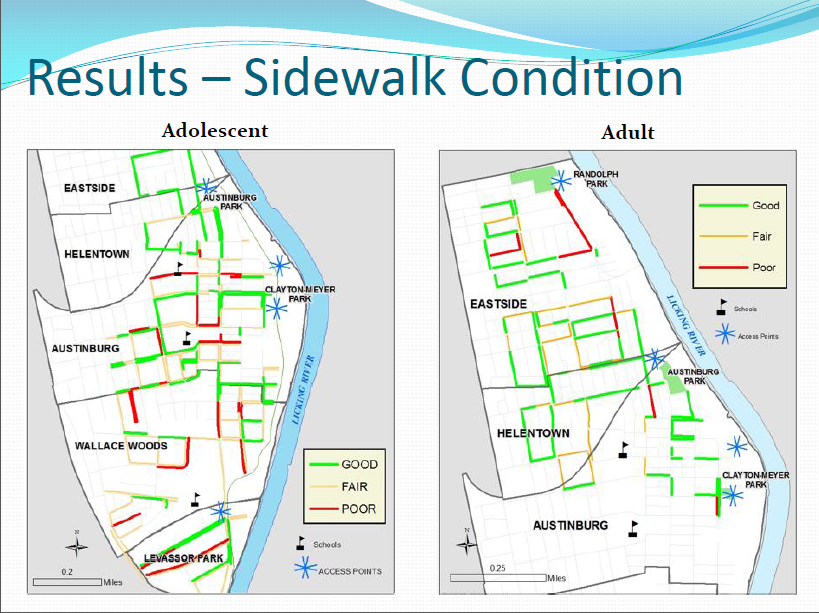
  • Sidewalk condition: good, fair, or poor
  • Traffic: no traffic, some traffic, heavy traffic
  • Safety: safe, neutral, not safe


Neighborhood Data Mapped for Better Analysis


Michael then took participants' data and used GIS to analyze the results. He visualized both adult and adolescent data.

Mapped data showing locations of complete sidewalks.

Mapped data showing sidewalk conditions in study area.

Mapped data of local residents' perceptions of traffic volume in study area.


Mapped data of local residents' perceptions of safety in study area.


Findings analyzed and mapped against poverty levels.


Lessons Learned


Michael's research identified many positives:
  • Good proximity of access points to neighborhoods and schools
  • Good presence and quality of surrounding sidewalks
There were also some areas of concern:
  • High perception of poor safety and high traffic near schools and access points
  • Barriers to access are more prominent in under-resourced neighborhoods
Targeted interventions and policy changes should consider not only the built environment, but also local perceptions of safety and traffic volume.

Michael will be presenting several upcoming HealthLandscape webinars. He'll also be glad to answer questions about his research during the webinars.

Register today to see how GIS visualization can help you see your neighborhoods in a new light.


The Community Data Portal
In-depth demonstration of our award-winning data dissemination tool
Tuesday, December 10, 2:00 pm EST
Visualizing Data with HealthLandscape
Overview of all of our data visualization tools, including the Site Performance Explorer
Tuesday, December 17, 2:00 pm ET
Introduction to HealthLandscape
In-depth instruction on using HealthLandscape, our free online mapping tool and data library
Tuesday, January 7, 2:00 pm ET